Category Archives: Tips on Tuesday

Tips on Tuesday

Today I am going to visit the current rumours on Facebook surrounding a wide scale hacking of accounts.

Facebook Aire Media Blog

You might have seen on your timeline a number of posts like this: –

Urgent
All the accounts are being hacked. The profile picture and your name are used to create a new Facebook account. Then they want your friends to add them, your friends think it’s you and accept. From this moment, the pirates can write what they want under your name!! ….. Please do not accept a 2nd invitation from me!! Copy this message on your wall to warn your friends!
Do not share. Make a copy and paste this message.
Just in case, protect your accounts!.

For once, unlike many of these viral warnings, it seems there is some element of genuine risk.  However, to put it into context.  Firstly accounts aren’t being hacked, no-one is entering your account on Facebook, they are copying your profile picture and creating a new account – so in effect cloning you.   Secondly, the level of occurence is in dispute, there is certainly no suggestion currently that it is all the accounts on Facebook.

So, what can you do to avoid this happening? 

  1.  Keep your account privacy settings high – my personal account is locked down so that if you searched my name, I wouldn’t appear at all.
  2.  Keep your friends list hidden – this means that if people do find your profile, they cannot see who you’re friends with apart from mutual friends.
  3. There is no harm in putting a basic warning on your Timeline, along the lines of “I only have one Facebook account, please do not accept another friend request from me”.  I would recommend rather than sharing/copying and pasting a viral post, simply post a warning.  Viral content is too easily ignored.
  4. Although this isn’t a hacking attempt, it is important to change your Facebook password regularly.
 

Tips on Tuesday

A slightly different format to our usual Tips on Tuesday slot as today is Safer Internet Day.  The safety of young people on the internet is one of our passions at Aire Media – in fact, we launched with a post about helping parents make sure their children are using Social media safely – so we thought we would #shareaheart with the wonderful people at the UK Safer Internet Centre and share our top tips for young people to stay safe online.

Safer Internet Day Aire Media

  1.  Never reveal your passwords to other people.  Choose a password that is really strong by using a mix of letters and numbers.  Make sure you change them regularly.
  2. Make sure you think before you post.   Never post anything you wouldn’t want your parents or teachers to read.  As soon as you press send, the information/image is no longer private.
  3. Be kind.  If you think your post could upset someone, don’t post it.
  4. Be really careful about what you share online.  Don’t give clues about where you live in either the information or the images you post. 
  5. Make sure you check your privacy settings regularly.  Bear in mind that you might think you’re only sharing something amongst close friends, but that isn’t always the case.
  6. Be careful who you talk to online.  If someone you don’t know tries to add you as a friend, ignore them and block them.   Don’t give people online your address and phone number.

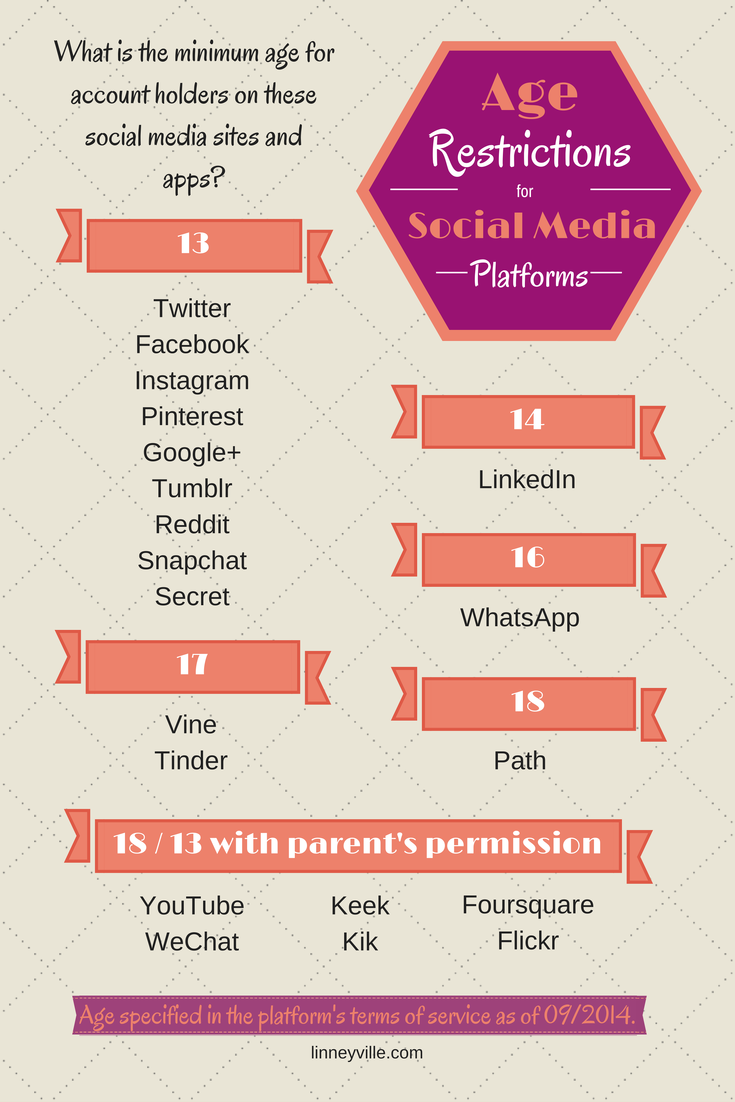
Social media platforms have an age limit for a reason.  It is to keep young people safe.  The people at Linneyville made this brilliant infographic giving details of the age limits across all social media channels.

Social Media Age Limits Aire Media

We hope you enjoyed today’s slightly different Tips on Tuesday.  If you would like to book Rachel to come talk to children or parents about staying safe online, please contact us here!

Tips on Tuesday

Today’s tip focuses on this little chap.  The hashtag.

Hashtag Aire Media Image

Let’s face it, before Twitter what on earth was this character for?!  Now however, the hashtag is a useful tool – you can use a variety of hashtags to get your tweets noticed.  You can either create your own or simply find out what is trending and utilise current popular talking points to get what you want to say out there.

A word of warning though.  #Don’t #over #use #the #hashtag.  #It #can #get #really #irritating.  See what I mean? 

See you soon for more snippets of social media advice!

Tips on Tuesday

Today’s bite size chunk of advice concentrates on Instagram.

InstagramLogo

Instragram made its name as an image sharing platform, but remember you can use text as well.

Don’t be afraid to use detailed description alongside excellent images.   A well written description can really put an image into context and capture someone’s imagination.  And always, always make sure your website address is visible!

Remember, half the battle on social media is getting seen!

See you next time!  In the meantime, why not browse back through our previous tips and find out what might work for you?

Tips on Tuesday

Welcome to the first Tip on Tuesday of 2016!

FacebookLogoOur first tip is short and sweet and focuses on Facebook and is simply this; if at all possible, post directly to Facebook rather than using a social media management tool.  Facebook algorithms are created to favour content posted personally, meaning you have a greater chance of your content appearing in people’s timelines.

Our Tips on Tuesday section is really about helping you – so let us know what you would like advice on and we will make sure you’re featured!

Tips on Tuesday

For today’s tip – our very last of 2015 – we would like to discuss Twitter.

Don’t make the mistake of only tweeting during “work hours”.  Make sure you regularly update your feed both in the evening and at weekends.  If this isn’t physically possible for you to do, there are a number of packages available that enable you to schedule tweets to appear at different times.

clockpicblog

Don’t miss a potential audience when you can tap into that group with a little organisation!

We will be back in 2016 with a whole new series of tips.  Until then, enjoy the festive season and Merry Christmas!

Tips on Tuesday

Today’s tip is our handy guide to social media image sizes to help you create the perfect profile.

FacebookLogo TwitterLogo GooglePlusLogo LinkedInLogo PinterestLogo InstagramLogo YoutubeLogo

Facebook

  • cover photo: 851 x 315
  • profile photo: 180 x 180

Twitter

  • header image: 1500 x 500
  • profile image: 400 x 400

Google+

  • cover photo: 2120 x 1192
  • profile photo: 270 x 270

LinkedIn

  • cover photo: 646 x 220
  • profile photo: 100 x 60

Pinterest

  • profile photo: 160 x 165

Instagram

  • profile photo: 110 x 110

YouTube

  • cover art: 2560 x 1440
  • cover art safe area: 1546 x 423

Tips on Tuesday

Today’s tip is about the most important thing for you when running a business – efficiency.

One of the most underutilized functions on Twitter is the ability to create Twitter Lists.  The lists allow you to organise and view the content most important to you, which then appears in a separate feed.  So for example you could have Twitter Lists for customers, potential customers, other accounts in the profession you interact with, professional advisers, etc.

The benefit of a Twitter List is you know who you’re engaging with, and have less content to sort through to make relevant contact and conversation.  This is where the efficiency part comes in – less time sorting through feeds means more time spent on meaningful interaction.

Create a list by clicking on the cog icon on your Twitter profile, and hitting the “Create List” button.  Give your list an identifying name and choose whether you want it to be private or public.  Then simply search for people you want to add to your list and insert them via the cog icon at the top of their profile.

You can also use public lists to discover useful contacts.  You can find public lists through anyone’s Twitter profile.  And remember, you don’t need to follow someone to utilise their public lists.

Happy organising!

Tips on Tuesday

Good afternoon everyone, you’re just in time to see this week’s Tip on Tuesday.

Today’s tip is in response to a saga I have been watching unfold on social media.  The tip does, in part, refer to a previous tip which you read here about the important of customer service.

Our tip is in fact very short.  Do NOT delete negative messages on your social media profiles.  That will create such a bad feeling about your brand.  Rather than delete; respond, apologise and ask what you can do to put things right.   Every business in the world will receive bad feedback at some point.  It is how you deal with that feedback that counts.

See you same time next week!